
Stripe Integrations for Affiliate Payments
June 10, 2026 · 12 min read
Stripe Integrations for Affiliate Payments
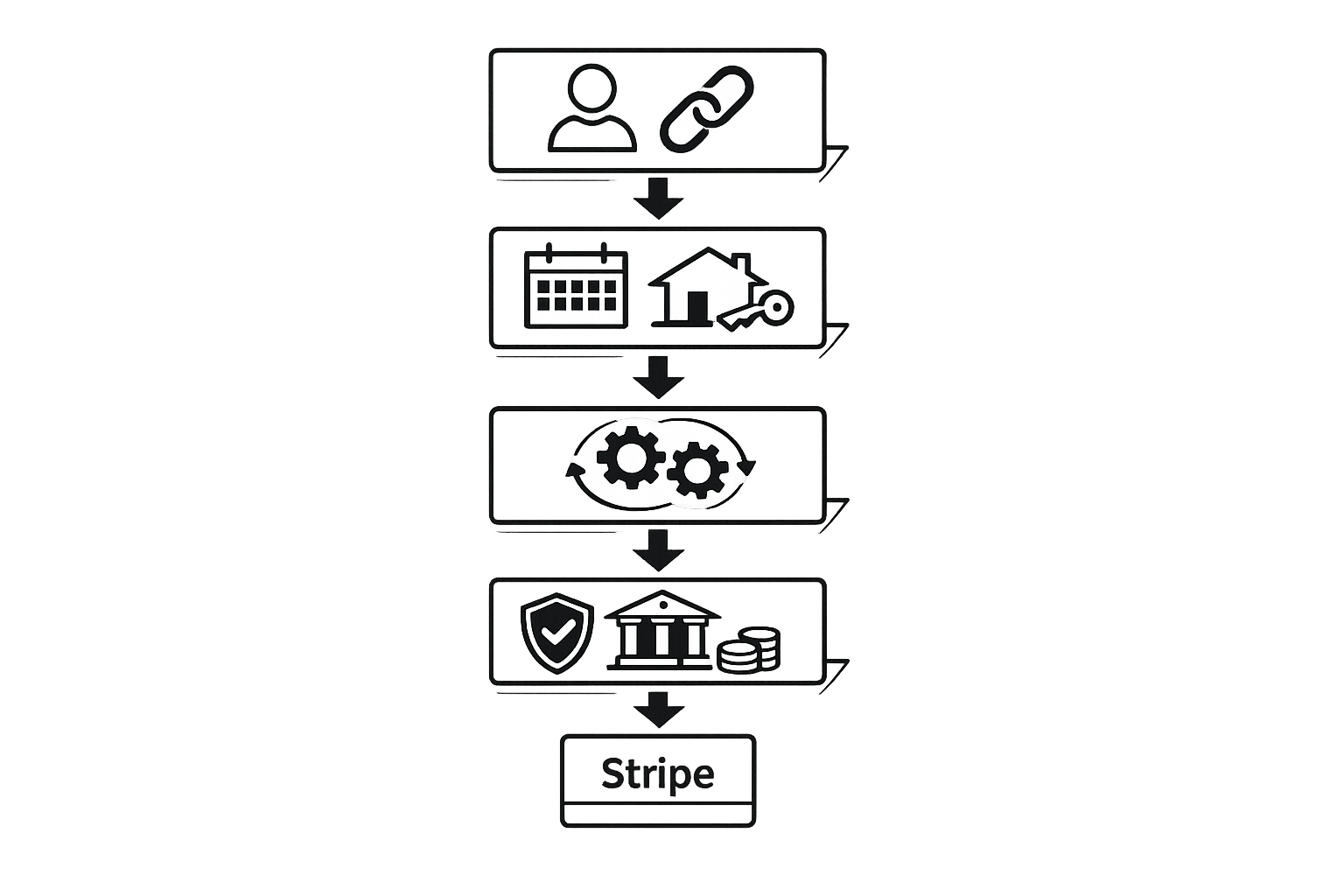
Stripe simplifies affiliate payments for rental businesses by automating the entire process. Here's how it works:
- Automation: Stripe Connect handles payouts directly to affiliates' bank accounts, eliminating manual effort and errors.
- Efficiency: Automating payments reduces administrative time by up to 16 hours per month for larger affiliate programs.
- Compliance: Stripe manages identity verification (KYC) and tax documentation (e.g., W-9/W-8BEN forms) to ensure legal requirements are met.
- Real-Time Updates: Webhooks provide instant notifications for bookings, refunds, and disputes, ensuring accurate tracking and payout adjustments.
- Customization: Flexible commission structures and payout thresholds ($50–$100 recommended) keep affiliates engaged while managing transaction fees.
- Tools: Platforms like Lockii integrate with Stripe for seamless rental operations, tracking, and affiliate attribution.
Setting Up Stripe for Affiliate Payments
Prerequisites for Using Stripe
To get started, you'll need a verified Stripe account with Stripe Connect enabled. This feature allows your platform to send payouts directly to affiliates' bank accounts without requiring you to handle their banking details. For most U.S.-based rental businesses, Express accounts are the ideal option, as Stripe takes care of identity verification (KYC) and bank account collection on your behalf.
Once Stripe Connect is set up, you can configure your payout schedule through the Stripe dashboard. A Net-30 schedule is commonly used in the industry. This means commissions earned in one month are paid the following month, giving you enough time to handle returns and refunds before processing payouts.
"Net-30 is the most common schedule for SaaS affiliate programs... It gives you enough time to process refund requests before paying out commission." - RefCampaign Team [3]
Defining Your Affiliate Program Rules
The two most important decisions for your affiliate program are your commission structure and payout threshold.
For the commission structure, rental businesses usually choose between a fixed fee per booking or a percentage of the rental value. A percentage-based commission works best for rentals with variable durations, while fixed fees are better for simple, single-transaction bookings. Decide on these rules before diving into integration.
For payout thresholds, a range between $50 and $100 is recommended [3]. This helps you avoid losing money to Stripe's per-transaction fees (0.25% per payout, with a minimum fee of $0.25), while also keeping affiliates engaged. Higher thresholds, such as $200 or more, can lead to affiliate churn.
Additionally, your program should include a clear refund policy. A 30–60 day grace period before commissions are paid is standard practice [1][3]. This ensures that any commission reversals due to canceled rentals happen before payouts are processed, not afterward.
Once your commission structure and thresholds are in place, map out the data flow needed for tracking affiliate activity and ensuring tax compliance.
Mapping Key Data Requirements
Accurate data flow is essential for tracking affiliate performance. The best approach is to store the affiliate_id in the Stripe Customer metadata object. Unlike browser cookies, metadata remains intact even if the user switches devices or clears cookies [6].
For U.S.-based businesses, tax compliance is non-negotiable. Collect a Form W-9 from every U.S. affiliate before their first payout. Waiting until they reach the $600 IRS reporting threshold can cause delays and expose you to penalties. If a valid W-9 isn’t on file, the IRS may impose a 24% backup withholding requirement [3][5].
To ensure smooth affiliate commission processing, monitor these key Stripe events:
| Stripe Event | Purpose in Affiliate Workflow | | --- | --- | | checkout.session.completed | Tracks new rental bookings and initial payments | | invoice.paid | Tracks recurring rental renewals or extensions | | charge.refunded | Triggers automatic commission reversal or adjustment | | customer.subscription.updated | Tracks changes in rental tiers (upgrades/downgrades) | | charge.dispute.created | Flags commissions for review due to fraud or chargebacks |
Integrating Stripe with Affiliate Tracking Tools
Integration Methods for Affiliate Tracking
There are three primary ways to link Stripe with an affiliate tracking system: purpose-built software, affiliate networks, or a custom in-house build. For most rental businesses, purpose-built tools are often the best option. They’re quick to set up and handle attribution and payout logic automatically.
| Method | Setup Time | Maintenance | Best For | | --- | --- | --- | --- | | Purpose-Built Software (e.g., PromoteKit, Rewardful) | Minutes to days | Low | Most rental SMBs | | Affiliate Networks (e.g., ShareASale) | Moderate | Low | One-time product sales | | Custom In-House Build | Weeks to months | High | Large enterprises with unique needs |
The process is consistent across all methods: a visitor clicks an affiliate link, a referral code is stored, they complete a booking and pay via Stripe, and the system ties that payment to the original affiliate click. Storing affiliate IDs in Stripe metadata ensures accurate attribution, even if cookies are cleared or the user switches devices.
For rental businesses, coupon code tracking is another practical option. Each affiliate gets a unique Stripe coupon code, and when a customer uses it during checkout, the system attributes the booking to that affiliate. This approach eliminates the need for cookies entirely.
With these steps in place, you’re ready to enable real-time payment communication using webhooks.
Using Webhooks for Payment and Refund Events
After setting up your attribution method, Stripe webhooks enable real-time updates between Stripe and your affiliate tracking system. The process is simple:
- Get your webhook URL from your affiliate tracking platform.
- In the Stripe Dashboard, go to Developers > Webhooks, create a new endpoint with that URL, select the relevant events, and paste the Signing Secret into your affiliate tool’s settings to validate data.
"Webhooks are essentially 'notifications' that Stripe sends back to your website. For example, if a payout fails due to an expired debit card, the webhook tells your affiliate plugin to mark that commission as 'failed' rather than 'paid.'" - Online Money Spinner
Focus on webhook events that complement your attribution setup, such as account.updated and payout.failed. These help you manage affiliate bank issues before processing payouts.
One critical tip: avoid converting the raw request body into JSON before verifying Stripe’s signature. Doing so will cause the verification to fail. Also, use Stripe’s event IDs to deduplicate incoming webhooks, ensuring you don’t accidentally create duplicate commission records if a webhook is retried.
With webhooks handling payment and refund events, the system becomes much easier to manage.
Connecting Lockii for Rental Operations
Once your attribution and webhook systems are in place, tools like Lockii can simplify rental payments and operations even further. Lockii handles the entire rental process, including contactless pickups with digital locks, online payments, identity verification, and booking management across multiple locations. Stripe processes all payments directly within Lockii.
Every booking processed through Lockii automatically generates Stripe payment events, ensuring your affiliate tracking system receives real-time updates without extra configuration. Plus, Lockii integrates with Zapier, making it easy to send booking and payment data to your affiliate platform, even if it doesn’t support direct Stripe webhook integration.
For businesses managing multiple locations, this setup is especially useful. A single affiliate link can drive bookings across all sites, and because attribution is stored in Stripe metadata rather than relying on browser cookies, it stays intact no matter how or where the booking is completed.
How to Set Up an Affiliate Program with Stripe and PromoteKit
sbb-itb-eb44693
Managing Stripe Payouts for Affiliates
Setting Up Affiliate Payouts
To onboard affiliates efficiently, use Stripe Connect Express. This approach allows affiliates to complete a Stripe-hosted process for identity verification (KYC) and bank account setup. By doing so, you avoid handling sensitive financial data directly, while Stripe takes care of compliance in the background.
For U.S.-based affiliates, ensure they submit a W-9 form, while international affiliates need to provide a W-8BEN. Without these forms, payouts could be subject to 24% backup withholding. Additionally, set a minimum payout threshold - commonly $50 - to streamline payments. To prevent paying commissions on transactions that might later be refunded or canceled, especially in rental businesses, implement a Net-30 or Net-60 holding period. This holding period ensures commissions remain "pending" until the refund window closes, reducing the risk of paying out on reversed transactions.
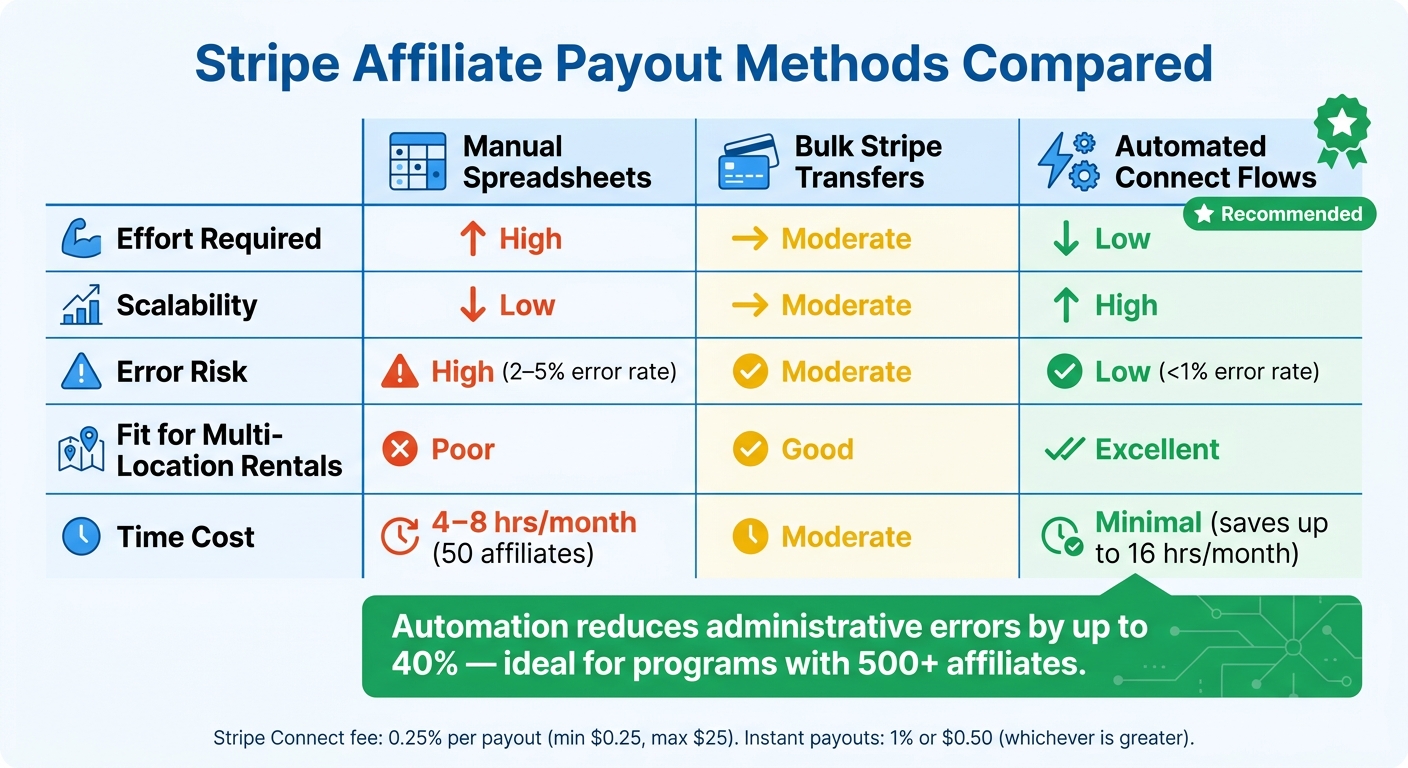
When using Stripe Connect Standard, transaction fees include 0.25% per payout (with a minimum of $0.25 and a maximum of $25). Instant payouts to debit cards cost 1% or $0.50, whichever is greater, while cross-border transfers add an extra fee ranging from 0.25% to 1%, depending on the destination [3].
This setup not only simplifies affiliate payouts but also ensures compliance and accuracy. Once configured, you can enhance the process further by integrating automation tools for real-time commission updates.
Automating Affiliate Payments with Zapier
Take your affiliate payment process to the next level by integrating Zapier. This tool allows you to automate data flow between Stripe and your affiliate platform, eliminating manual steps. For example, when a rental is completed in Lockii, a Stripe payment event is triggered. Zapier captures this event and updates the commission record in your affiliate platform.
Here’s how a Zap might work for a rental business:
- Trigger on Stripe "Payment Intent Succeeded".
- Filter by metadata, such as an affiliate ID stored at the time of booking.
- Update the affiliate commission record in your platform.
- Trigger a payout when the affiliate's balance exceeds the minimum threshold.
Lockii simplifies this process by storing affiliate attribution directly in Stripe metadata at the time of booking. This eliminates the need for manual lookups, making it especially useful for businesses with multiple locations. With this setup, a single affiliate link can track bookings across all sites, while Zapier ensures commissions are logged automatically.
Comparison of Payout Methods
As your affiliate program grows, it’s critical to choose a payout method that reduces manual effort and minimizes errors. While spreadsheets might work for small programs, they quickly become unmanageable. For instance, managing payouts manually for just 50 affiliates can take 4–8 hours per month [5].
"Manual payouts are not just time-consuming - they are error-prone. A mistyped bank account number... can cost you money and damage your relationship with affiliates." - icodrip.com [5]
| Method | Effort Required | Scalability | Error Risk | Fit for Multi-Location Rentals | | --- | --- | --- | --- | --- | | Manual Spreadsheets | High | Low | High | Poor | | Bulk Stripe Transfers | Moderate | Moderate | Moderate | Good | | Automated Connect Flows | Low | High | Low | Excellent |
Automated Connect flows stand out as the best option for scaling. While manual processes can have error rates of 2–5%, automation drastically reduces mistakes [9]. For rental businesses managing affiliates across multiple locations, the upfront investment in automated systems pays off with significant time savings and improved accuracy. Choosing the right payout method is essential for maintaining the efficiency of your Stripe-integrated payment system.
Monitoring and Optimizing Affiliate Payments
Reconciling Affiliate and Stripe Data
Once your automated payout system is in place, keeping your data organized is crucial. A two-way sync between Stripe and your affiliate tool ensures smooth reconciliation and eliminates duplicate entries by using unique Stripe event IDs. This sync is a key part of your system, as it processes Stripe webhooks - such as invoice.paid, charge.refunded, and payout.failed - while writing metadata back to Stripe customer records. This setup allows you to manage reconciliations directly within the Stripe dashboard, eliminating the need to switch between platforms [10].
To streamline the process, commissions should follow clear lifecycle stages. For example, commissions can start as "Pending" during the refund window and then transition to "Due" once that period ends. This structured approach creates a reliable audit trail, supporting compliance and fraud prevention efforts seamlessly.
Compliance Requirements for U.S.-Based Businesses
For U.S.-based affiliates earning $600 or more annually, a Form 1099-NEC must be issued by January 31 [3]. If an affiliate fails to provide a W-9, you're required to withhold 24% of their payments as backup withholding and send it to the IRS [3].
"If a US affiliate does not provide a W-9, you are required to withhold 24% of their payments as backup withholding and remit it to the IRS." - RefCampaign Team [3]
The easiest way to stay compliant is to make tax form submission mandatory during onboarding - before any payouts are processed. Stripe Connect simplifies this with a secure onboarding flow that collects W-9s, ensuring sensitive data never touches your servers. For international affiliates, you’ll need to gather a W-8BEN (for individuals) or a W-8BEN-E (for entities). These forms expire every three years and should be retained for at least three years after the affiliate relationship ends.
"Stripe handles tax documentation through their Connect platform. US affiliates can access and download their 1099 forms (when applicable) directly through their Stripe Express Dashboard." - Andrew Munro, Founder, AffiliateWP [11]
Staying compliant is just one piece of the puzzle - robust controls are also necessary to prevent fraud.
Preventing Fraud and Managing Disputes
To reduce fraud risks, implementing a 30–60 day holding period for commissions is a smart move. This delay keeps funds pending until the likelihood of refunds diminishes. Additionally, set up webhooks for charge.dispute.created to automatically flag disputed commissions for manual review [4][7]. Tools like Lockii's booking and item audit logs can be invaluable here, as they provide timestamped records of each transaction, making it easier to verify legitimacy before releasing payments.
Automating your affiliate system doesn’t just save time - it can cut administrative errors by up to 40% [1]. When every payment is tied to a specific revenue event through an immutable ledger, resolving disputes becomes far more efficient [9].
It’s also a good idea to routinely check for "Restricted" account statuses in your affiliate dashboard. A restricted status signals that Stripe requires additional identity verification from an affiliate. If left unresolved, this can silently block payouts and complicate your reconciliation efforts [8][11].
Conclusion
Using a Stripe-powered affiliate payment system provides a dependable and scalable solution for your rental business. By tying commissions directly to verified rental bookings and processing them through a PCI-compliant system, the entire workflow becomes smoother and more efficient.
Automation plays a key role here, drastically cutting down on manual errors. In fact, businesses that adopt automated payout systems see administrative mistakes drop by as much as 40% [1]. When you're managing 500 or more affiliates, manual systems simply can't keep up.
"Automating this process doesn't just save time - it builds the trust necessary to retain high-performing partners." - Online Money Spinner [1]
The benefits of automation are amplified with integrated tools like Lockii. For rental businesses, the combination of Stripe Connect and Lockii ensures a seamless connection between bookings and payouts. Lockii's built-in Stripe integration keeps sensitive payment data off your servers, while its audit logs provide timestamped transaction records. These features make it easier to verify commissions, resolve disputes, and maintain compliance [12].
To optimize your program, set clear commission rules, link your affiliate tracking tool using webhooks, align holding periods with your rental refund policies, and automate tax collection during onboarding. Nail these steps, and your affiliate program can evolve into a self-sustaining growth engine.