
How to Set Up Digital Locks for 24/7 Rentals
June 11, 2026 · 14 min read
How to Set Up Digital Locks for 24/7 Rentals
Want to run a 24/7 rental business without the hassle of physical keys or staffed handoffs? Digital locks are the answer.
Here’s the deal: Digital locks let you manage customer access remotely using PIN codes, apps, or Bluetooth. These locks are paired with automation systems to handle bookings, verify identities, and manage access seamlessly - no staff required. The result? Lower labor costs, round-the-clock operations, and automate rental business operations for a better customer experience.
Key Takeaways:
- How they work: Digital locks use electronic credentials (e.g., PIN codes) that activate and expire based on booking times.
- Why they’re useful: They cut costs, eliminate scheduling issues, and enable self-service rentals for trailers, bikes, or equipment. If you're new to this model, check out these self-service rental common questions.
- What you need: Time-bound locks, weatherproof hardware for outdoor use, and a management platform like Lockii to automate codes and bookings.
- Security tips: Use unique, time-limited codes for each booking, monitor access logs, and schedule regular maintenance.
By following these steps, you can create a streamlined, self-service rental system that operates efficiently and securely, even across multiple locations.
Digital Lock Basics and Rental Requirements
What Are Digital Locks and How Do They Work?
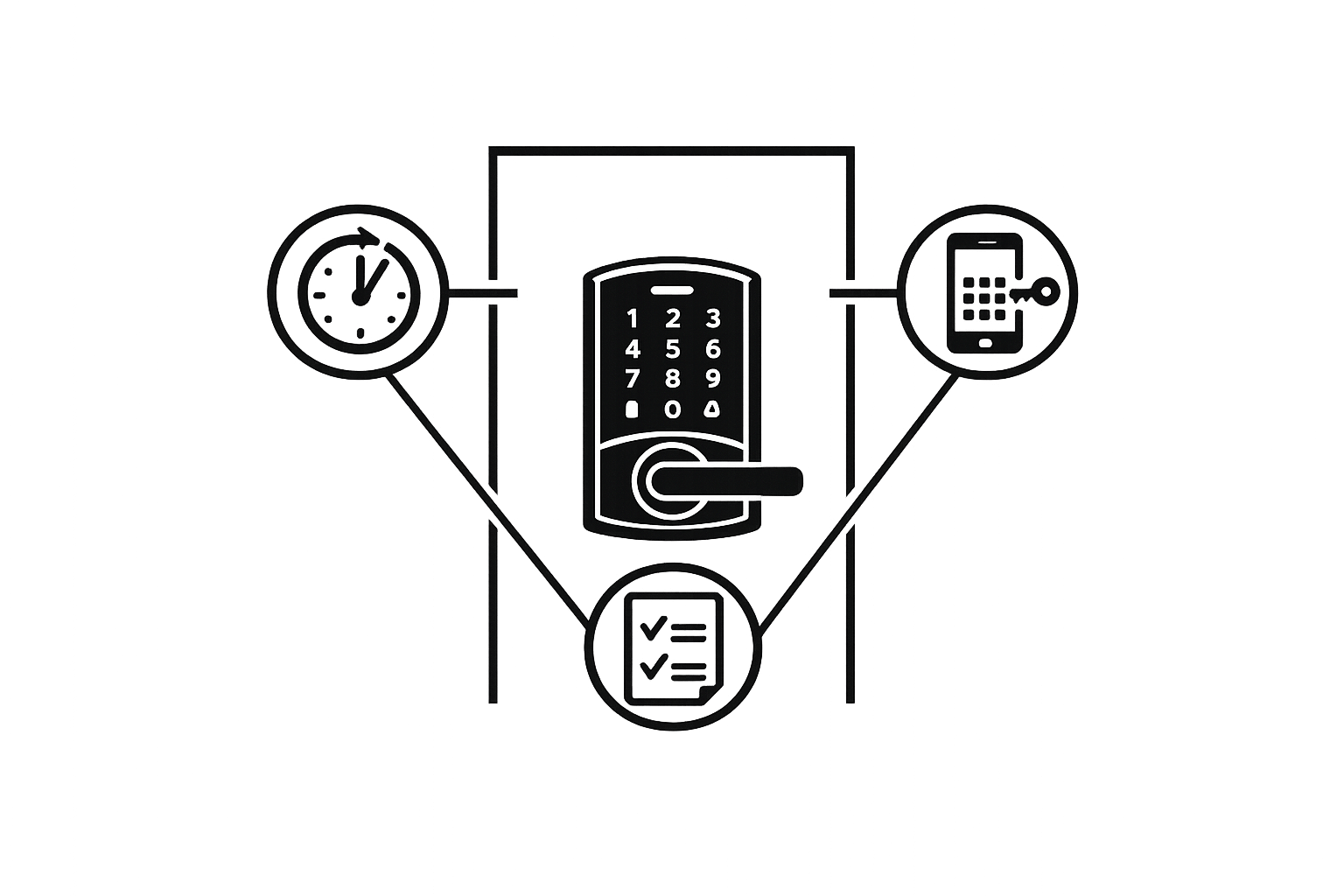
A digital lock swaps out the traditional key for an electronic credential like a PIN code, smartphone app, or Bluetooth signal. Inside, a motorized deadbolt handles the locking mechanism, while a connectivity module (using Wi‑Fi, Bluetooth, Z‑Wave, or Zigbee) enables remote control. When the correct code is entered on the keypad, the motor moves the bolt, eliminating the need for physical keys or in-person exchanges.
Rental-grade digital locks take things a step further by addressing the unique needs of guest turnover. These locks can automatically create, schedule, and expire unique access codes that sync directly with reservation details. For example, a code activates at check-in and deactivates at checkout, often with a built-in buffer of 1–2 hours for added flexibility.
This technology forms the backbone of automated, around-the-clock rental management systems.
Access Control Needs for 24/7 Rentals
To run a fully contactless rental operation, you need more than a lock that accepts PIN codes. The system must handle several essential tasks automatically. Key features include:
- Time-bound access: Codes should activate and expire in sync with each booking window, ensuring precise control.
- Unattended check‑ins: Customers should be able to pick up and return items without needing staff. In fact, about 95% of bookings in automated systems are completed without any human involvement [1][4].
- Audit trails: Every time the lock is accessed, the event should be logged with a timestamp. This helps with resolving disputes, tracking damages, and managing maintenance.
- Multi-location support: For businesses operating across multiple sites, managing locks through a centralized dashboard saves time and reduces complexity.
For high-value rentals, like trailers or specialized equipment, adding identity verification before issuing a code provides an extra layer of security [1].
Security Best Practices for Digital Locks
The biggest security risks with digital locks often stem from poor code management rather than the hardware itself. Issues like shared codes, codes that never expire, or codes without time limits can create serious vulnerabilities. For example, in a rental fleet of just 10 items, failing to revoke 5% of codes after checkout could result in 25 unauthorized access points over a year [5].
To minimize risks, every user should receive a unique, time-limited code. Staff codes should only work during their scheduled hours, and maintenance codes should be rotated every 90 days [5].
From a compliance perspective, U.S. fire safety regulations require that locks can always be opened from the inside without needing a code. Before installing any lock in an enclosed space, ensure it meets these standards. Additionally, review your state’s data privacy laws for storing access logs, as these records tie timestamps to specific customers [5]. Following these guidelines ensures your system is both secure and compliant.
sbb-itb-eb44693
Setting Up Hardware, Connectivity, and Locations
Choosing the right hardware and planning its connectivity are essential for smooth 24/7 rental operations.
How to Choose the Right Digital Lock Model
The lock you choose directly impacts code generation, customer access, and maintenance. For 24/7 rentals, the most important feature is time-bound PIN code support. This allows you to generate unique codes that activate at pickup and expire at return, all without manual intervention.
Another must-have is offline functionality. Many rental sites, such as parking lots or trailer yards, lack reliable Wi-Fi. A lock that relies on constant internet connectivity can cause headaches. For example, IglooHome locks use a deterministic algorithm to validate time-bound PINs without needing to connect to a server.
"You can and should put the locks in locations without internet, and Lockii will still be able to generate codes that allow your customers to access their items." - Lockii Docs [6]
For outdoor locations in the U.S., ensure locks have an IP65 or IP66 rating for weather resistance and can function in temperatures ranging from −4°F to 140°F. This range covers most U.S. climates, from freezing Minnesota winters to scorching Arizona summers [16]. IglooHome padlocks and keyboxes typically cost between $150 and $300, depending on the model [13].
Here’s a quick checklist for evaluating locks:
| Criteria | What to Look For | | --- | --- | | Code type | Time-bound, unique PINs per booking | | Connectivity | Offline/Bluetooth support for remote sites | | Weather resistance | IP65/IP66 rating for outdoor durability | | Temperature range | −4°F to 140°F for U.S. climates | | Platform integration | Compatible with automation tools (e.g., Lockii + IglooHome) | | Lock form factor | Padlock, deadbolt, or keybox for asset needs | | Code timing | Some locks generate codes in hour blocks, e.g., a 9:15 AM booking may require a 9:00 AM code [6] |
Once you’ve selected the right locks, the next step is planning their placement for seamless customer access.
Planning Lock Placement Across Locations
Before installing locks, map out every touchpoint a customer interacts with during pickup and return. This ensures your rental process remains fully self-service. Even one manual step, like unlocking a gate or accessing a key safe, could disrupt 24/7 operations.
Align the lock type with the asset. For example:
- Trailers and bikes: Smart padlocks on couplers, racks, or chains provide flexibility as inventory changes.
- Storage rooms and sheds: Deadbolts or lever locks on doors are more practical.
- Vehicles: Instead of modifying the ignition, use a key lockbox near the parking space for easy key handoffs [13][17].
Use a consistent naming system across your locks to simplify management. A format like Location – Zone – Asset ID – Lock Type works well. For example:
Austin-Downtown_LotB_TR-07_PadlockPHX-Airport_Gate1_Keybox
Physically label each lock with a weatherproof tag matching its digital name. This helps customers and staff quickly match booking instructions to the correct lock on-site [14][20].
Once your locks are placed, focus on ensuring reliable power and connectivity.
Power Sources and Connectivity Requirements
Most rental-grade locks are battery-powered and support offline functionality. Typical battery life ranges from 6 to 12 months on 4 to 8 AA alkaline batteries, depending on usage [6][16]. Battery-powered locks are ideal for remote locations like parking lots or trailer yards where wiring isn’t practical. For permanent indoor setups, consider hardwired low-voltage locks. These eliminate battery changes but require professional installation and compliance with electrical codes.
Code generation and distribution are handled by your management platform, which sends codes to customers via SMS or email. This means locks don’t need on-site Wi-Fi to function [5][14]. However, if you’re using Wi-Fi-enabled locks at a central location, check signal strength with a Wi-Fi analyzer app. Aim for at least −65 dBm at each lock’s location. Weak signals in large outdoor lots can leave customers stranded with non-working codes [15].
Always have a backup entry plan. Options include:
- A physical key override stored securely.
- An emergency code that support staff can generate remotely.
- A nearby redundant asset ready for quick activation.
Set low-battery alerts in your platform, typically at 25–30% battery life, and keep spare AA batteries on hand to avoid last-minute issues [6][16]. A little preparation goes a long way in keeping your locks operational and your customers happy.
Configuring Digital Locks for Rental Operations
Once your locks are installed and connected, the next step is to set them up to handle your rental operations seamlessly. Automating this process not only saves time but also enhances efficiency.
Setting Up Access Control Roles
Access control roles are like permission layers that determine who can do what. For a 24/7 rental setup, you'll typically deal with three groups: customers, staff, and admins.
- Customers should only have access to the lock associated with their booking, and only during the rental period.
- Staff and admins need broader access for tasks like maintenance and oversight.
A key rule: _never_ provide customers with a permanent code. Every access code should be tied to a specific booking, asset, and time window. To add an extra layer of security, require customers to verify their identity (e.g., with a driver's license) before sharing the lock code. This simple step can significantly reduce theft, especially in unattended locations [1][2].
Once you've defined these roles, you can move on to automating PIN creation for each booking.
Generating Time-Bound Access Codes
Time-sensitive PIN codes are essential for ensuring secure, automated access. Here's how it works:
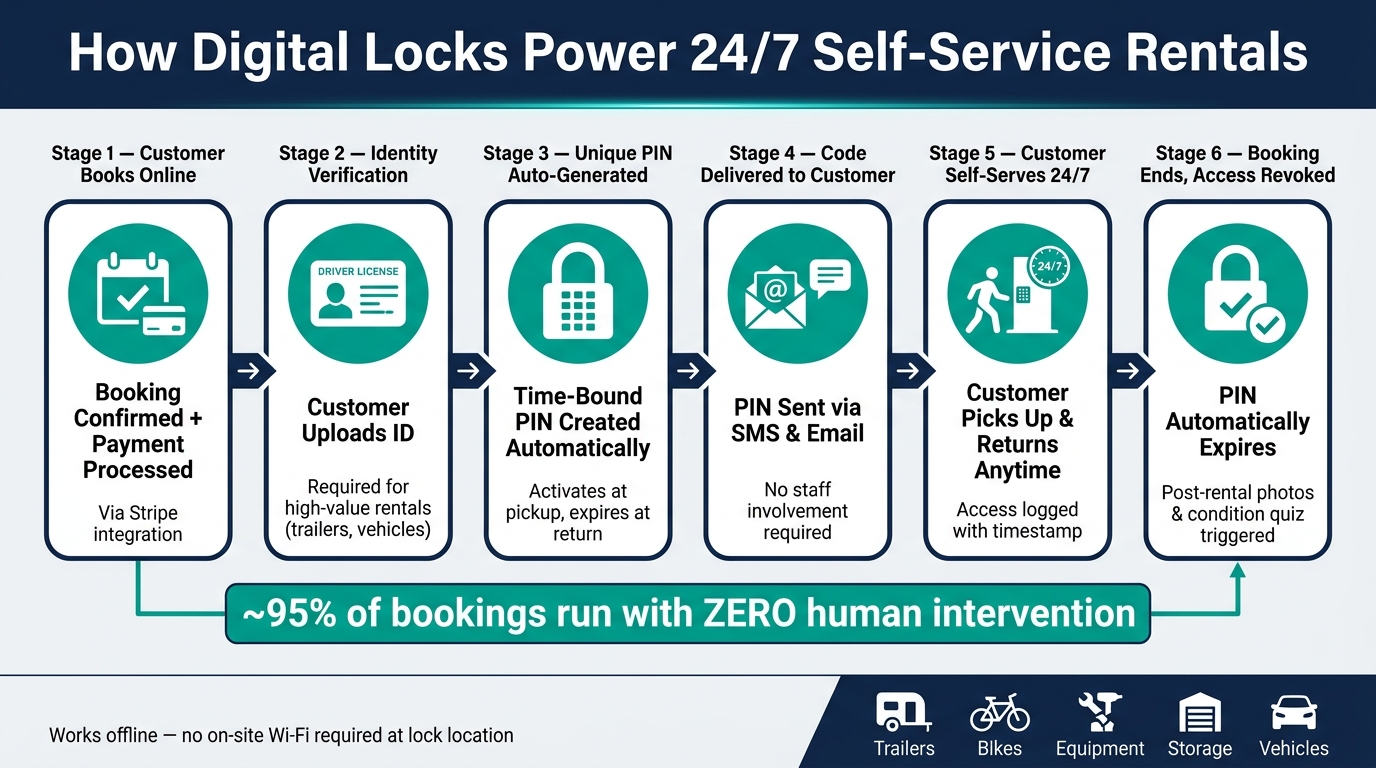
- A unique PIN is generated automatically when a booking is confirmed and the payment clears.
- This code is sent to the customer via SMS or email and works only during the rental period. Once the booking ends, the code becomes invalid [1].
If you're using IglooHome hardware, keep in mind that codes might activate slightly before the booking starts due to hardware requirements [6]. To keep everything running smoothly, sync your locks with the mobile app every 2–3 months. This prevents time drift, which could cause PINs to activate or expire incorrectly [6].
Here's a real-world example of this system in action:
"Customers book online, receive a unique pin code, and pick up their trailer without any staff intervention. It's streamlined, secure, and exactly what our business needed to jump in front of our competitors!" - Mario Clewlow, Operator, Hitch Haul [4]
Before launching your system, always test it by placing a manual order through your platform. This ensures the correct PIN is generated for the right dates and lock [6].
Configuring Lock Behavior and Rules
Your locks can do more than just generate codes - they can adapt to different scenarios, like booking extensions or maintenance periods.
- Booking Extensions: If a customer extends their rental and makes an additional payment, the system should automatically update the PIN expiration without requiring any manual input [1][2].
- Maintenance Lockouts: When an asset is under repair, set it to a maintenance status. This removes it from the booking pool, ensuring customers can’t access it, while still allowing your team to do so.
With these configurations in place, your rental system can operate almost entirely on autopilot. In fact, about 95% of bookings in fully automated setups require no human involvement [1].
Integrating Digital Locks with Rental Automation Systems
Once your digital locks are set up and connected, the next step is integrating them with your rental automation system. This integration ties together bookings, payments, identity verification, and customer communication, creating a seamless experience for both operators and renters through contactless self-service.
Connecting Locks to a Central Management Platform
After setting up your hardware, integrating with Lockii brings everything together for smooth rental management. Start by pairing your lock via Bluetooth using the manufacturer’s app, which typically takes about two minutes. Then, link your lock account to the management platform by navigating to Settings > Locks and assigning the lock to the appropriate asset in your dashboard.
Naming conventions are crucial for clarity. For example, a label like _"Phoenix – Lot A – Trailer Bay 03 Front Gate"_ is much more practical than _"Lock 7"_ when managing multiple locations. Once mapped, the platform takes over, automatically generating, delivering, and expiring access codes as needed.
An important note: IglooHome locks don’t require an active internet connection at the lock’s location to accept new codes. This makes them a reliable option for remote or outdoor rentals where connectivity might be an issue [6]. With this centralized integration in place, you’re ready to fully automate your operations.
Using Lockii for 24/7 Rental Automation
Lockii is designed specifically for rental automation, handling the entire process from booking to access. Once a booking is confirmed and payment is processed through Stripe, Lockii selects the best available item, generates a unique time-limited PIN for the lock, and sends it to the customer via SMS and email - all without any manual input [1].
The platform also includes identity verification, which is especially valuable for high-value rentals like vehicles or trailers. Operators can require customers to upload a driver’s license and complete verification before receiving their access code [3][1]. With automated pre-rental instructions and a "find my order" page, customers can easily pick up their rental at any time. This automation allows about 95% of bookings managed through Lockii to run without human intervention [1].
Mapping Lock Access to the Booking Life Cycle
Lock access should align perfectly with the customer’s booking status. Here’s how it works:
| Booking Stage | Lock Access Status | Automated Actions | | --- | --- | --- | | Reserved | No access yet | ID verification request, payment confirmation | | Active | Time-bound PIN enabled | Code sent via SMS/email, access logs activated | | Extended | PIN validity updated automatically | Adjusts payment, end time, and notifications | | Completed | Access revoked | Triggers hire-end photos, return quiz, and damage logging |
For example, if a customer extends their rental using Lockii’s self-service extension feature, the system automatically updates the lock’s access window, charges the additional fee via Stripe, and adjusts notifications accordingly. Once the booking is marked complete, post-rental workflows - like submitting hire-end photos and completing condition quizzes - are triggered automatically [1][3].
This integration ensures that lock access is always in sync with the booking, preventing unauthorized entry and eliminating errors common with manual systems.
Maintaining and Securing Your Digital Lock System
Building a Layered Security Setup
To strengthen your digital lock system, consider layering security measures like time-bound codes and identity verification. For instance, provide staff or contractors with temporary, dedicated codes instead of sharing master credentials. This is especially crucial for high-value rentals, such as trailers or vehicles [1].
Avoid sharing master codes with cleaning crews or staff. Instead, issue single-use codes with limited active windows - like a 4-hour code for a cleaner during each visit. This approach ensures your master credentials stay safe, even if a contractor's phone is lost or compromised. For long-term staff access, rotate their codes every 90 days to minimize the risk of unauthorized use [5].
"A code that doesn't get revoked at checkout is a security incident waiting to happen." - Bassel Abedi, Founder & CEO, Nowistay [5]
Additionally, ensure that all codes are automatically revoked when bookings end [1].
Monitoring Access Logs and System Health
Effective security goes beyond code management - continuous monitoring is key. Log every access event and track connectivity issues like dropped Bluetooth or Wi-Fi signals. This allows you to quickly address anomalies, such as a staff code being used outside of business hours or a customer code accessed before their rental period begins [5].
Tools like Lockii's Item Audit Logs and Booking Audit Logs provide a detailed history of interactions tied to rental items or bookings. These logs are invaluable for resolving disputes, as they allow you to verify when a lock was accessed and cross-check it with pre- and post-rental photos or customer responses. Configure your management platform to alert you to offline locks or unusual activity across your locations, so you can act swiftly [1].
Routine Maintenance and Settings Reviews
Keeping your digital lock system reliable requires regular maintenance. For battery-powered locks, schedule replacements every 6–12 months [5]. Use your rental management software to block out items during maintenance windows and log the work in the item's audit history. This ensures accurate records and prevents accidental bookings during service periods [1].
Beyond battery replacements, conduct end-to-end system tests periodically. Create a test booking to confirm the entire process works seamlessly: code generation, delivery via SMS and email, and automatic revocation at checkout. These tests help identify and fix configuration issues before they affect real customers. Additionally, maintain a physical key backup in a secure lockbox, and update its master code every quarter for added security [5].
Conclusion: Key Steps for Setting Up Digital Locks
Setting up digital locks for 24/7 rentals involves bringing together hardware, software, and security measures into a system where everything works smoothly. From choosing the right lock model and strategically placing it, to creating time-sensitive access codes and automating customer notifications, every step plays a role in creating an efficient, self-sustaining operation. This setup ensures a balance of safety, convenience, and the ability to grow.
When done correctly, about 95% of bookings can run without any manual intervention [1]. This level of efficiency can completely change how rental businesses operate. Platforms like Lockii are designed to make this possible by integrating tools such as IglooHome smart locks, Stripe for payments, GPS tracking, and automated notifications via SMS and email. This allows businesses - whether renting trailers, equipment, bikes, or surfboards - to operate across multiple locations without adding significant overhead costs.
To keep your system running smoothly, it’s important to follow maintenance routines like updating access codes regularly, checking audit logs, and replacing batteries on schedule. These steps are crucial for ensuring the system remains reliable and secure over time.
Start small by implementing this system at a single location. Fine-tune your workflow, and once everything is running efficiently, you’ll be ready to scale up easily to additional locations. The groundwork you lay now will make future expansion a much simpler process.